Translating Emotions, Not Just Words: I Built My Family a Translator

My parents speak Assamese. My in-laws speak German. They are about to meet for the first time, and the only thing between them is a phone being passed back and forth across the table.
I've been in that situation as a traveller, too. You hold out a phone, the other person squints at it, and you both miss each other completely. So I built something better.
PolyGo is a small web app on my Raspberry Pi. You speak or type in your language, everyone else in the room reads and hears it in theirs, and it knows my family's rules.
Why the usual tools weren't enough
I've looked at those expensive handheld translators. They shine in the adverts, but the reviews tell a different story, and people end up complaining about the quality. I've tried a lot of things. Google Translate is good enough for day-to-day, passive translation: a menu, a sign, a street name. It even handles conversation. But the back and forth is the problem. Everything lives on one device, so someone has to pass it around the table. Sometimes the network is too slow. And most importantly, it doesn't learn the nuances of a language.
These were my frustrations:
- Most online translators are limited in what they support.
- They translate fine, but they don't always carry the meaning I actually wanted to say.
- My parents and family speak Assamese, and support for such a niche language is very limited.
- We have our own nuances. For instance, we type and speak Assamese in Latin letters ("Anglo-Assamese"), even though the language has its own script.
- Devices that claim to translate take in your voice and give back a voice. You'd need two of them, and swapping them back and forth is annoying.
- If you pass one device around the room, nobody knows who said what.
Enter PolyGo
So I started brainstorming. If you use Gemini, ChatGPT or Claude, they do a splendid job at translation, and they remember rules. You can teach them your whole family: how to address each relative, where the boundaries are, which words you use at home. But that only solves half of the problems above. The other half is the experience: microphones, speakers, passing a phone around.
I kept exploring, and then it struck me. I already own a Raspberry Pi.
A Pi can't run a model this good, but it doesn't have to. It can be the small, always-on box in the middle: it holds my family's rules, talks to Claude, and serves a tiny web app that any phone can open. No app to install.
The next question was how to expose it to the world without opening my home network. And here my day job helped. For years in robotics I've worked with ROS nodes: small programs that each do one job and talk to the rest of the system through narrow, well-defined messages. That's exactly the shape I wanted. The Pi is a node. It offers one thing, translate this, and nothing else. The model itself runs with every tool switched off, so the only thing it can do is translate. A free Tailscale Funnel gives the Pi a public HTTPS link, and no port is opened on my router.
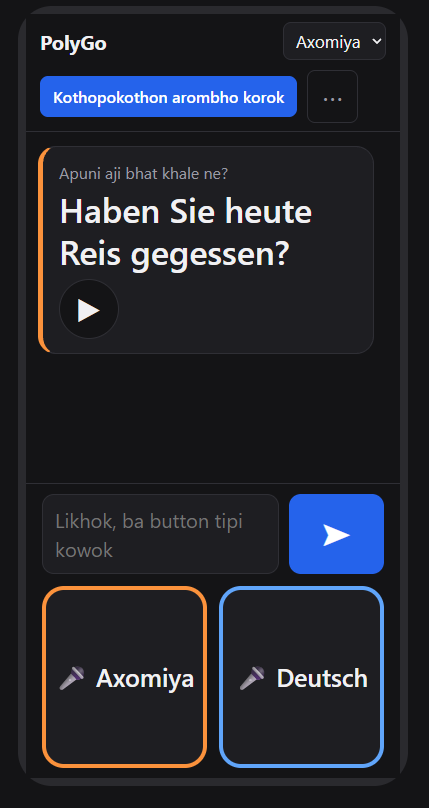
The simple view. Two big microphone buttons, named in each language, and a text box if you'd rather type. Here a sentence in Anglo-Assamese comes out as polite German.
How it works
Here is one message, start to finish:
sequenceDiagram
    participant P as Phone
    participant Pi as Raspberry Pi
    participant C as Claude
    Note over P,C: Tailscale Funnel gives the Pi a public HTTPS link, no router port open
    P->>Pi: What I said, as text
    Note over P: The browser does the listening
    Pi->>C: Translate this, plus my family's rules
    Note over Pi,C: Claude has every tool switched off
    C-->>Pi: The translation
    Pi-->>P: Translated text
    Note over P: The browser reads it aloud
The phone's own browser does the listening and the speaking, so there is no paid speech service anywhere. The Pi keeps one long-running Claude session with strict interpreter instructions and my family's glossary. The only running cost is a small API bill each month.
A short message comes back in seconds.
Teaching it my family
This is the part Google Translate can't do.
- A private glossary. Family names, how to address each relative, grammar rules I care about. It never leaves the Pi.
- Formal or informal. In Assamese, apuni and tumi are not interchangeable. You say the first to a parent-in-law and the second to a friend. German has the same split with Sie and du. One setting decides it, and nobody has to be accidentally rude.
- A "Wrong?" button. If a translation is off, I type what it should have said. It's saved and used from then on. The more we use it, the better it gets.
- Anglo-Assamese by default. My family writes Assamese in Latin letters, so that's what it writes back. The script is one tap away.
Assamese was the hardest part. Chrome's Assamese speech recogniser returned English-looking text, so I listen with the recogniser instead. The scripts are close enough that Claude can read the result by sound.
flowchart LR
    A["Mama speaks Assamese"] --> B["Chrome's  recogniser"]
    B --> C["Claude reads the result by sound"]
    C --> D["Anglo-Assamese or German"]
And when it isn't sure, it says so. Instead of a confident wrong answer, it shows the meaning in English. A wrong translation told to a grandparent is worse than none. Together with the "Wrong?" button, that makes a small loop:
flowchart TD
    A["Translate"] --> B{"Sure?"}
    B -- "No" --> C["Show the meaning in English"]
    B -- "Yes" --> D["Show the translation"]
    D -- "Looks wrong: tap Wrong?" --> E[("I type the fix, it is saved in the glossary")]
    E -. "used from then on" .-> A
One conversation, many phones
The last frustration was "no idea who said what". So I added sessions. Someone taps Make a session and shares a link or a QR code. Everyone who joins gets their own language: they hear and read everything in it, and each message shows the name of whoever said it. My mother can speak Assamese, my mother-in-law can speak German, and I can follow along in English. Nobody passes a device around.
Sessions live only in memory. Nothing is saved, and the link stops working after a day.
sequenceDiagram
    participant M as Mama
    participant Pi as Pi
    participant C as Claude
    participant O as Oma
    participant Me as Me
    M->>Pi: Anglo-Assamese message
    Pi->>C: One call: German and English
    C-->>Pi: Both translations
    Pi-->>O: German, plus the original
    Pi-->>Me: English, plus the original
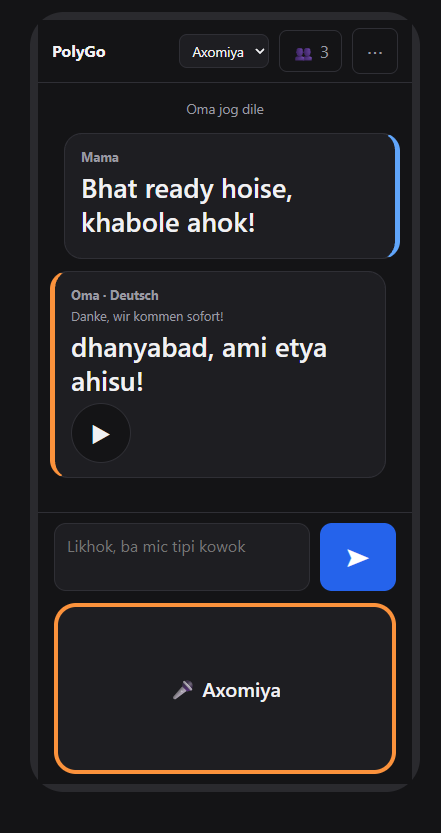
Here is the same short conversation, seen from both phones. First, Mama's (fictitious test) phone, set to Axomiya. She wrote in Anglo-Assamese, and Oma's (again fictitious) German reply arrives translated, with the original underneath:
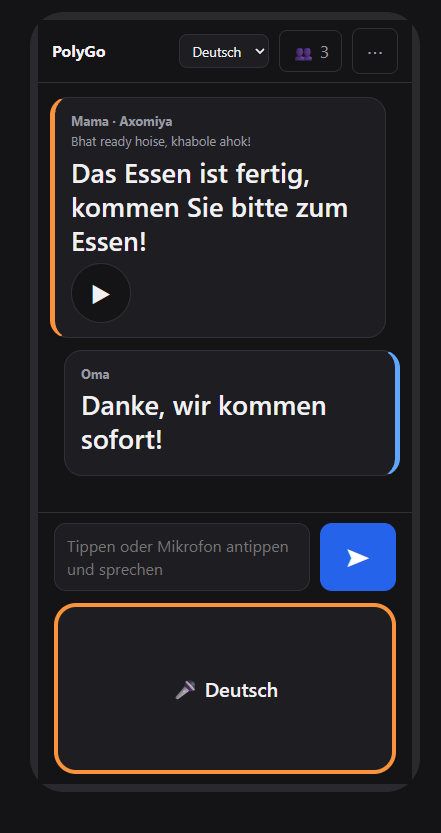
And Oma's phone, set to German. Mama's message arrives in German, with the Axomiya original above it and her name on top, so there's no doubt who said what:
Keeping it private
A translator on a public link would let anyone spend my quota, so security mattered from the start. I began with one shared family passcode and replaced it, because a shared secret is the first thing that leaks.
Now every phone is its own device with its own key. I make an invite for each person, such as my mother or my mother-in-law. It's a single-use link, and it also sets their language. Whoever opens it first becomes that device, and the link is spent. If a phone is lost, I remove it in two taps. Admin links expire in 24 hours, and the server refuses to remove the last admin so I can't lock myself out.
sequenceDiagram
    participant A as My phone (admin)
    participant S as Raspberry Pi
    participant N as New phone
    A->>S: Create an invite (admins only)
    S-->>A: Single-use link, random token
    Note over S: Keeps only a scrambled copy
    A->>N: I send the link privately
    N->>S: Opens the link
    S-->>N: Phone becomes a device
    Note over S: Link spent. Lost phone: remove it
Most importantly, nobody can fake an invite. Only an admin's phone can ask the server to create one, and each link carries a long random token (128 random bits, far too many to guess). The server keeps only a scrambled copy of it, so even a leaked file can't be used to get in. These aren't "signed" links in the cloud-storage sense. The server remembers every invite it hands out, and that is exactly why a link can work once and can be cancelled. The one thing no design can stop is someone opening a genuine link before the person it was meant for, so I send them privately, and I can always see an unknown phone in my device list and remove it.
I also added a stats page for myself: messages per day, per phone, and how much the engine is being used. It stores counters only, never what anyone said.
What I'd tell you if you build your own
- Put the rules in a file, not in your head. The glossary is what makes it mine.
- Let the phone do the audio. The browser's speech tools are free and good enough.
- Let it say "I'm not sure." Honest beats confident.
- Measure before you worry. One call that translates into every language in the room is the cheapest option, because the long instructions are cached and only the new sentence costs anything.
Where it stands
I've tested it on my own phones and it works. The real test, with my parents and my in-laws on the same call, is next. After that comes the part I'm most excited about: a Wi-Fi setup mode, so the Pi can travel in a bag, ask a phone hotspot for internet wherever we are, and still translate.
Translating words is the easy part. What I really wanted was for my mother to make a joke and have it land. And with my in-laws meeting my parents for the first time, nobody wants a fight to start over a mistranslation. :)
Enjoyed this one? Get the next post by email — no spam, unsubscribe anytime.
Subscribe →